Sariee
A MENA-focused SaaS website builder where AI uses business context to propose relevant page templates instead of sending users into a generic template library.
- Role
- Product Designer (Freelance)
- Company
- Sahm IT Solutions
- Project type
- SaaS product design
Ownership: End-to-end product design: onboarding, AI-assisted matching flow, template experience, builder workflows, and delivery specifications.
An AI-assisted template-matching flow that turns business context into a more relevant starting point
Evidence: Shipped product screens, design specifications, and implementation handoff.
Contents
Overview
Sariee is a SaaS website builder for the MENA region, designed for freelance client Sahm IT Solutions. It lets anyone, from a freelancer building a portfolio to a small business setting up an online store, describe what their site is for and receive a matching set of templates. AI shapes template and page recommendations from the first screen, rather than appearing as a separate chatbot layer.
Problem
Generic website builders hand every user the same wall of templates, regardless of whether they are opening a bakery, a real estate listing site, or a portfolio. That works for design-confident users and slows everyone else down with choices that do not match their actual business.
Sariee needed an onboarding path that could narrow that wall down to relevant options immediately, without turning the builder into a rigid, industry-locked product.
Goals
- Get a new user from “I need a website” to a relevant, ready-to-edit template as fast as possible.
- Make the AI-assisted matching feel like a shortcut, not a black box, something users understand and trust.
- Cover the breadth of a real small-business and freelance market (from NGOs to jewelry to CVs and resumes) without a template library that feels unmanageable.
- Support the full path from template to a live, owned domain, not just page design.
Business Context
Sahm IT Solutions wanted a product that could compete with established international website builders while being built specifically for MENA business owners and freelancers, many of whom were choosing their first website tool without deep design or technical background. Being early to industry-aware, AI-assisted template generation was the product’s clearest point of difference in that market at the time.
Research
Constraints
Discovery
Watching how competing builders onboard new users showed the same pattern: an empty canvas or an unfiltered template grid, both of which push the real decision-making onto the user.
The opportunity was to move that decision earlier, into a single, low-effort onboarding question. The template grid a user lands on is relevant from the first tap, not an unfiltered wall of options.
Strategy
Onboarding opens with one direct question, “What’s your site about?”, answered either by tapping an industry category or typing a free description when nothing fits. That answer feeds directly into the template gallery, which opens pre-filtered to the closest matches and stays fully searchable and filterable (by price, designer, category) for anyone who wants to keep exploring. From there, the same site flows into a visual builder and then a domain search and registration step, so the path from “what is this site for” to “it’s live” stays continuous.
UX Decisions
A single-question onboarding, not a wizard
A category grid plus a free-text fallback stands in for a multi-step setup wizard, keeping onboarding no longer than it needs to be.
AI matching shown, never hidden
Surfaced as a labeled, visible feature (“With the help of our AI Integration!”) next to a manual “Design Your Own Template” option, always in plain view as a way around it.
Metadata on every card
Price, “Designed By,” rating, Free versus Paid shown directly on each result, enough to decide without opening every option.
Advanced controls in a persistent side panel
Fonts, colors, themes, store data, domain and hosting live in one place, not buried in nested menus, so a user can jump straight to the one setting they need.
Wireframes
Structure moved fast from the onboarding question into the builder itself, since the core interaction, tap or describe, then land on a matching template, needed to be validated in a working prototype rather than static screens. The builder’s own layout borrows a familiar left-panel, center-canvas pattern common to page builders, so returning users from other tools would not need to relearn the basics.
UI Design
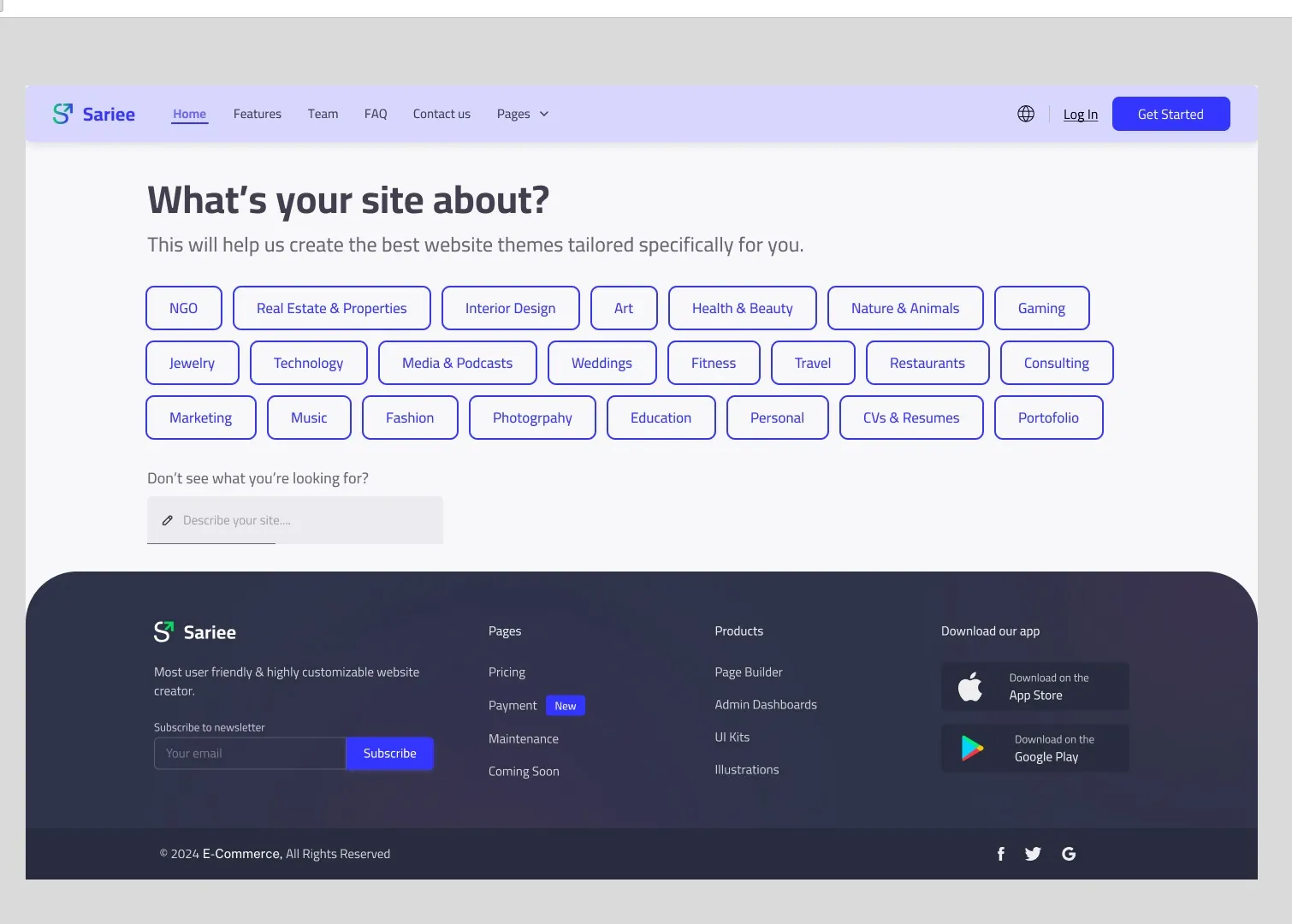
Onboarding presents a clean grid of industry categories under “What’s your site about?”, with a text input below for anything not covered.
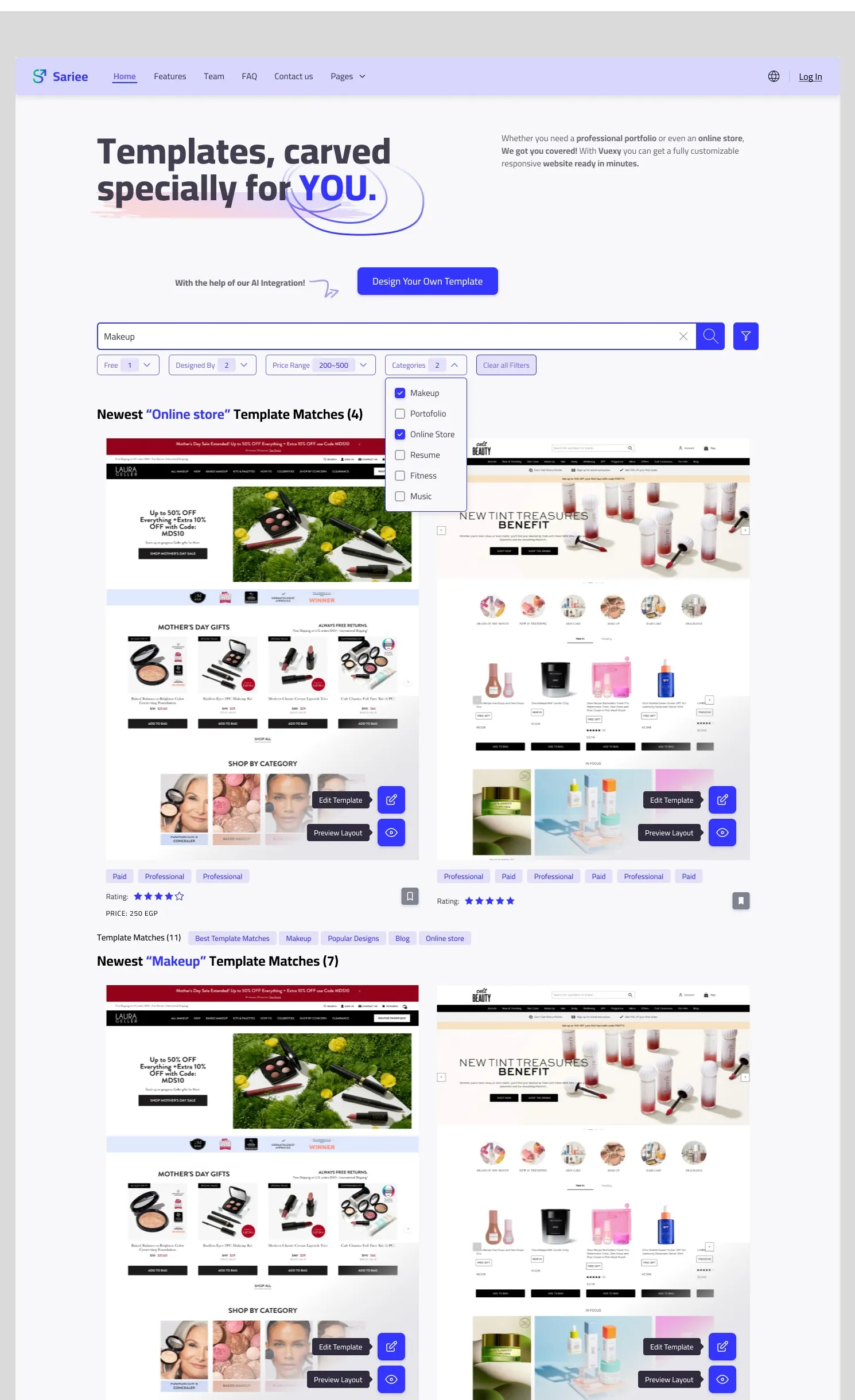
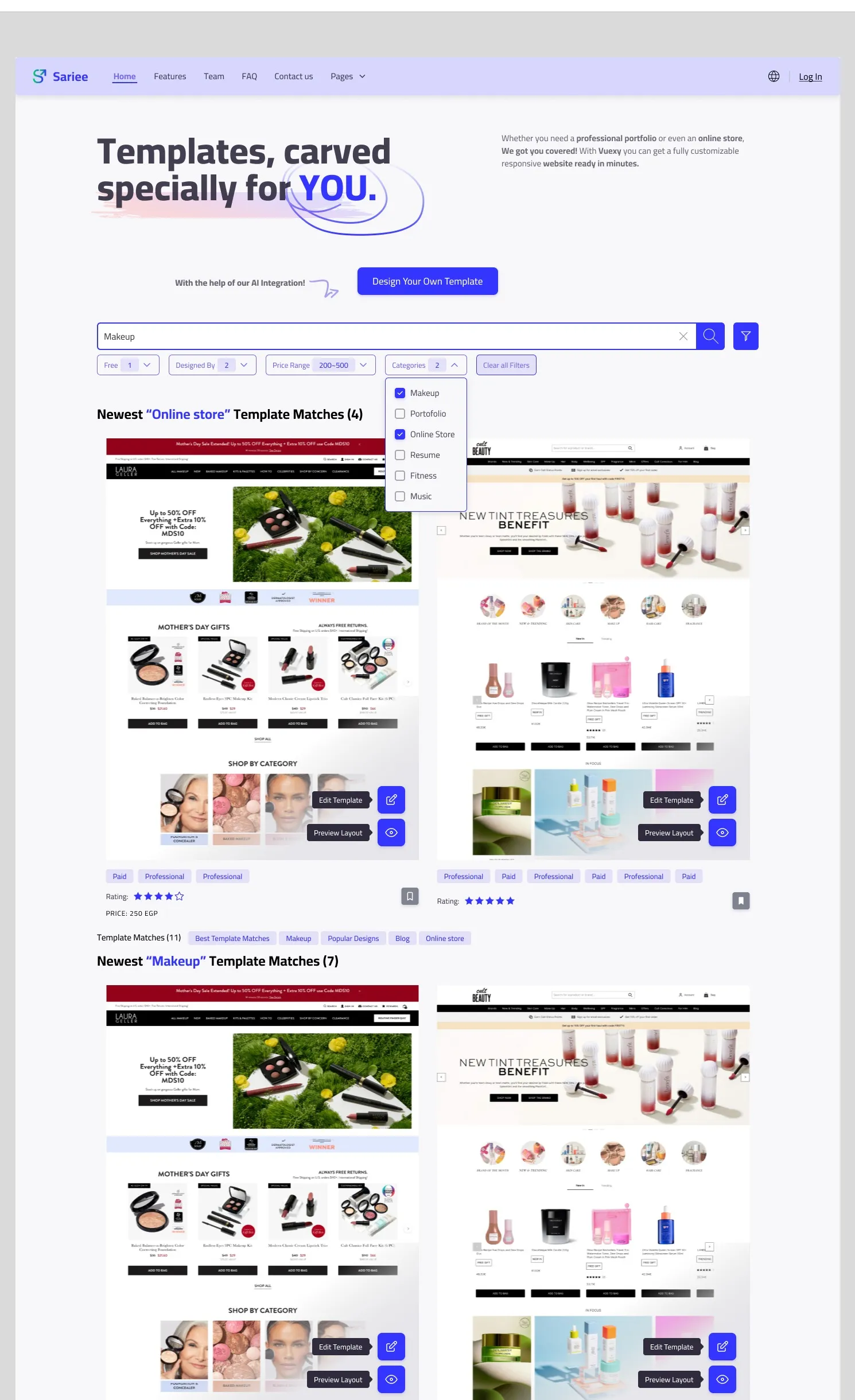
The template gallery pairs a search bar and filter row (Free, Designed By, Price Range, Categories) with template cards showing a live preview, rating, and price.
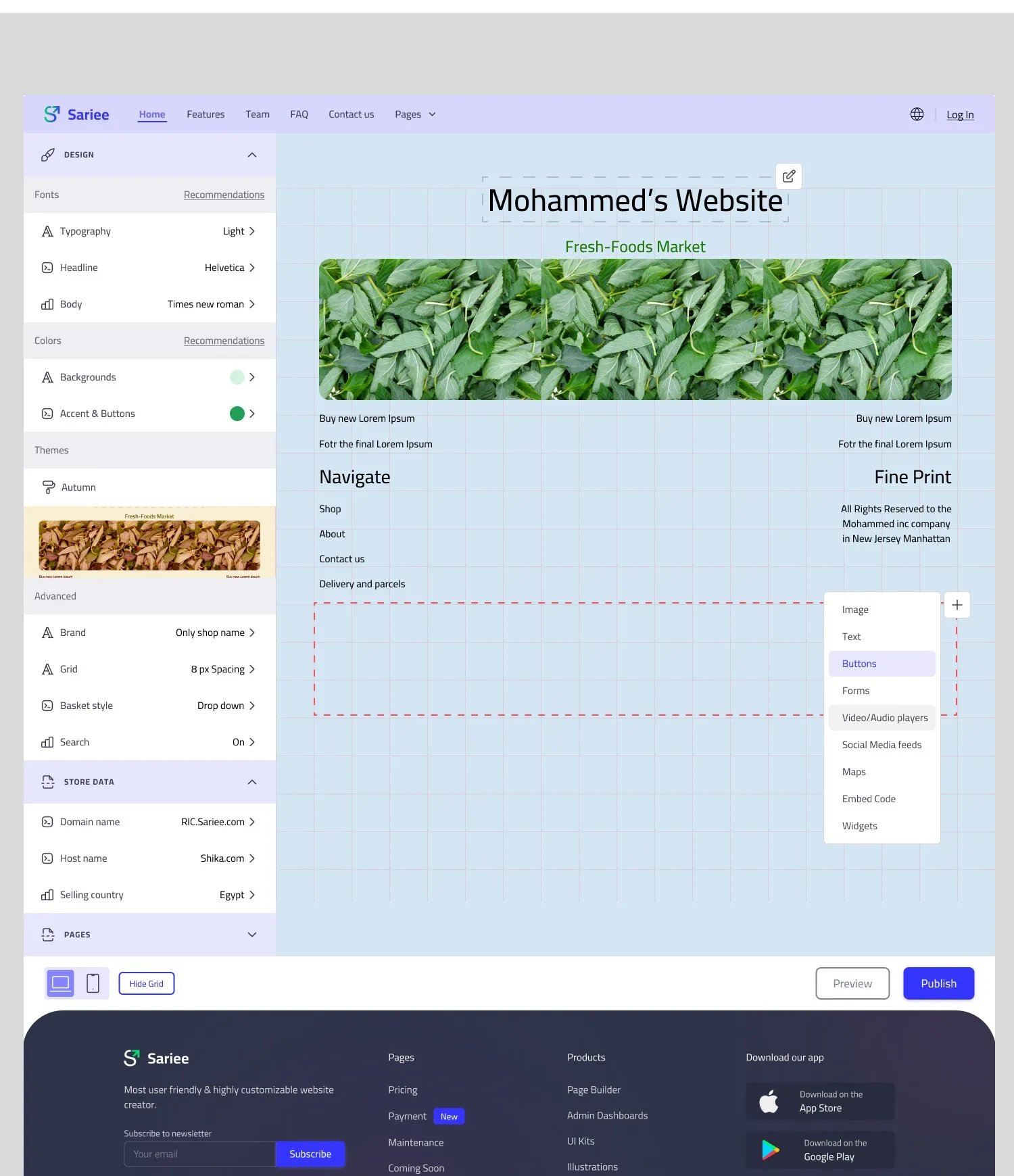
The builder itself splits into a left panel (Design, Colors, Themes, Advanced, Store Data, Pages) and a live canvas showing the site exactly as a visitor would see it, with a floating block-insertion menu (Image, Text, Buttons, Forms, Video, Social feeds, Maps, Embed Code, Widgets) for adding new sections.
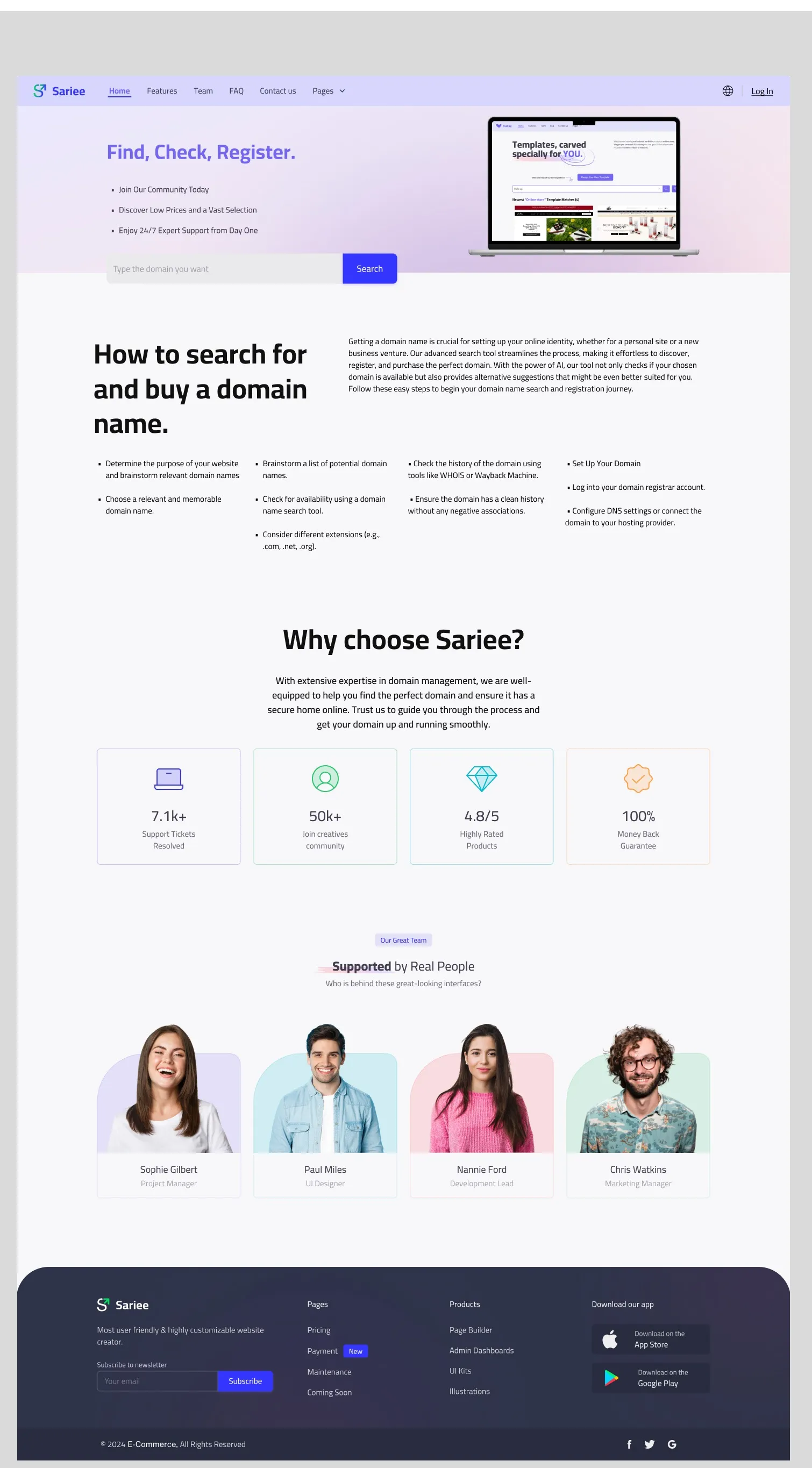
A separate domain flow (“Find, Check, Register”) lets a user search, check availability, and register a domain without leaving the same visual language.
Motion
Interaction feedback stayed functional rather than decorative: category selection, filter changes, and the block-insertion menu all respond immediately, since the priority for a builder product is confidence that an action registered, not flourish. The AI-matching moment was the one place motion carried real meaning: a small pointer-and-label callout introduces the feature the first time a user sees it, lighter than a full explainer screen.
Design System
Sariee’s interface uses a light, blue-and-purple palette with a consistent card pattern across onboarding, the template gallery, and the builder itself, carrying the same visual language from “describe your site” through to “publish it.” The builder’s own theme system (fonts, colors, saved themes like “Autumn”) is presented in the same visual style as the marketing site around it, so switching between building a site and configuring one never feels like two different products.
Engineering Collaboration
Accessibility
Testing
As a freelance engagement, formal usability testing was not part of the scope. The clearest validation was functional: confirming the AI-matching-to-template handoff worked end to end, and that the full path from onboarding to a published, domain-connected site could be completed without a dead end.
Business Impact
For Sahm IT Solutions, shipping an AI-assisted, industry-aware onboarding gave Sariee a real point of difference against generic international builders in the MENA market, positioning it as an early mover on a feature that later became common across the category.
Results
Sariee shipped as a complete product: an AI-assisted onboarding flow, a searchable and filterable template gallery, a full visual site builder with theme and store configuration, and an end-to-end domain search and registration flow.
Learnings
The most useful design decision was keeping the AI-assisted path optional and visible, not mandatory: the feature only had to be good, not perfect, to earn trust. A user who felt mismatched by the AI’s first guess still had a full manual search and filter path one tap away, a graceful fallback, not a dead end.
Reflection
Sariee was an opportunity to make a short answer about a business useful from the first screen. Building the manual fallback in from the start made the AI feature a convenience rather than a gate.